
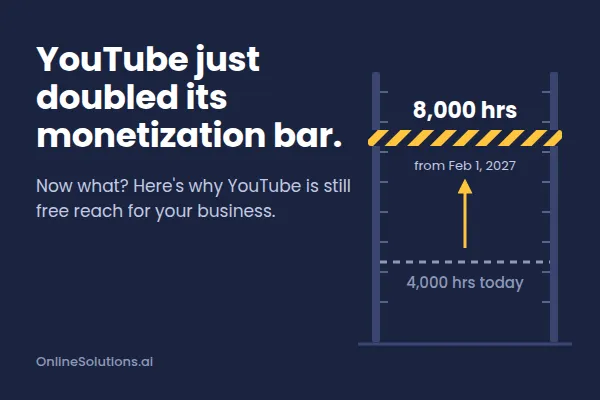
YouTube Just Doubled Its Monetization Bar. Now What?
If you've been posting on YouTube and hoping to get paid someday, the finish line just moved. Starting February 1, 2027, YouTube is doubling what new channels need before they can earn ad money. In this post, I'll walk you through what's changing, how to tell where you stand, and why YouTube is still worth your time even if you never get a check.
What YouTube Is Changing on February 1, 2027
YouTube announced these changes in August 2026. They're the first big changes to its payout program since 2018.
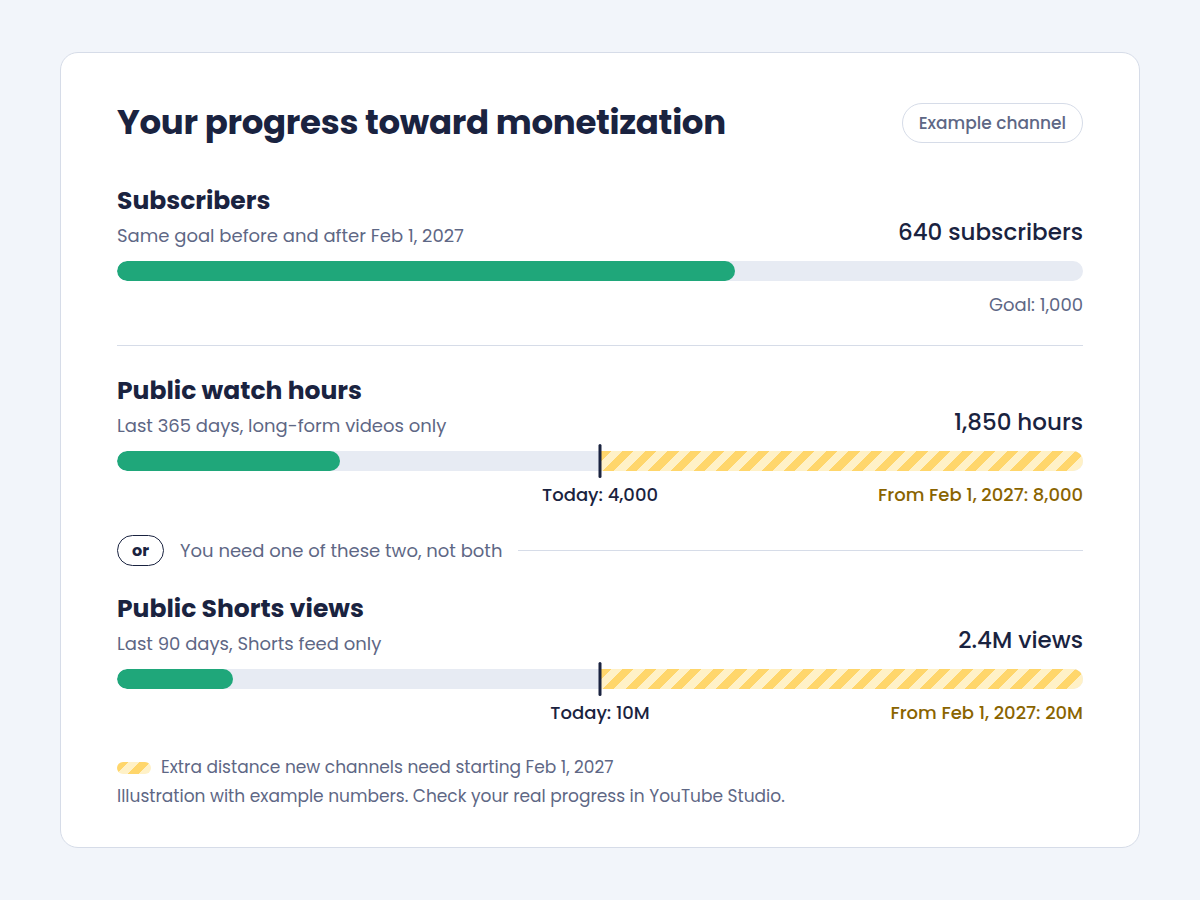
That program is called the YouTube Partner Program, or YPP. It's how YouTube shares ad money with creators. To get in, new channels will need 1,000 subscribers (same as today), plus one of these:
8,000 watch hours on public long-form videos in the last 365 days (up from 4,000)
20 million views on public Shorts in the last 90 days (up from 10 million)
Two quick definitions:
Watch hours: the total time people spent watching your regular, long-form videos.
Shorts: vertical videos up to 3 minutes long, like the ones you post on TikTok.
The smaller tier isn't changing. With 500 subscribers, 3 public uploads in the last 90 days, and either 3,000 watch hours or 3 million Shorts views, you can unlock fan features like channel memberships, Super Chat, Super Thanks, and YouTube Shopping. That tier doesn't include a share of ad money, though.
Already in YPP? You keep your spot. But a few things still change for you:
You need to accept YouTube's updated terms in YouTube Studio by January 31, 2027, or your earnings pause until you do.
To keep earning from Shorts, you'll need 10 million Shorts views every 90 days.
To count as an active channel, you'll need at least one of these: 1,000 watch hours in the past year, 1 million Shorts views in 90 days, or 2 long-form videos or 5 Shorts uploaded every 90 days.
Your next step: Decide which group you're in: not monetized yet, getting close, or already in.
Why This Matters (and Why It Matters Less Than You Think)
Let's do the honest math. 8,000 watch hours is 480,000 minutes. If people watch your videos for 2 minutes on average, that's about 240,000 views in a year just to qualify.
There's another catch most people miss. Views from the Shorts feed don't count toward watch hours. So if you only post Shorts, you're on the 20-million-views track. That works out to about 222,000 views every day for 90 days straight.
For most small business owners, that's a long climb. And here's the thing: ad money was never the main prize for a business anyway.
The real prize is reach. YouTube is a huge search engine and a busy Shorts feed. Every video you post there is another free chance for a new customer to find you. You don't need to be monetized to get that.
The real cost of this change? People see "8,000 hours," get discouraged, and stop posting. That's free reach left on the table.
Your next step: Write down why you're on YouTube. If the honest answer is "to get more customers," this change barely touches you.
How to Tell If You're Leaving Reach on the Table
Run through this quick check. If any of these sound like you, there's room to improve:
You don't know your current watch hours or Shorts views.
You post to TikTok but rarely (or never) to YouTube.
Your reposted videos still have the TikTok logo bouncing around on them.
Your videos use trending songs from TikTok.
Some of your videos are set to private or unlisted. Only public videos count.
Your website isn't in your video descriptions or on your channel profile.
You post in bursts, then disappear for weeks.
The good news: YouTube shows your exact progress inside YouTube Studio, both on your computer and in the Studio app.
Your next step: Count how many items you checked. Each one is an easy fix.
What "Done Right" Looks Like
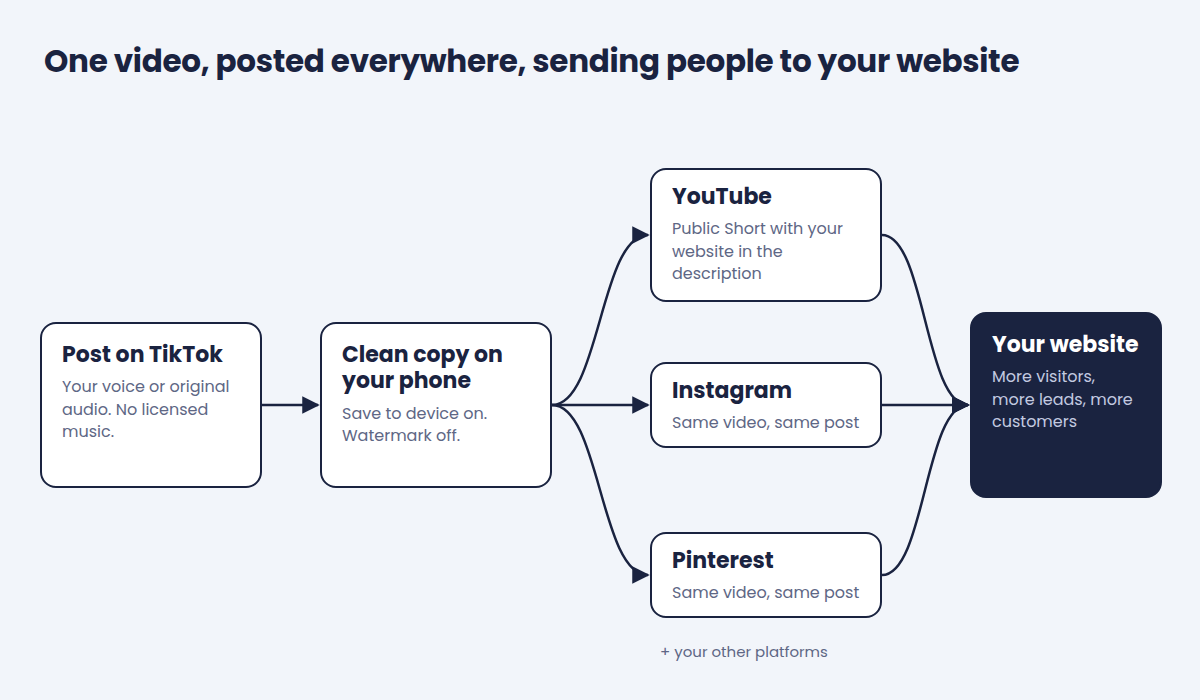
When this is set up well, YouTube becomes a second home for every video you already make. No extra filming. Here's the picture:
Every video you post on TikTok also lands on YouTube.
Each video is clean: no other app's logo, no licensed music.
Every upload is public, so it counts and can be found.
Each video has a clear title and your website in the description.
Your website is linked on your channel profile.
The same video also goes out to Instagram, Pinterest, and your other platforms.
You check your progress about once a month, not every day.
Your next step: Pick the one item on that list you're furthest from. Start there.
The 4 Stages of a Smart Repurposing Workflow
Repurposing means making a video once and posting it in many places. Here are the stages. Fair warning: the exact settings are where most people trip up.
1. Create with YouTube in mind
Film like normal, but skip the trending songs. TikTok's music library is licensed for TikTok only. On YouTube, that same song can get your video flagged, muted, or have its ad money sent to the music owner. Your own voice or original audio is the safe choice.
2. Keep a clean copy
You want a copy of every video saved to your phone without the TikTok watermark. A watermark is the app's logo and your username stamped on the video. TikTok now lets you control this when you post, so it mostly comes down to having the right settings on.
3. Post once, everywhere
Upload the video to YouTube as a public Short, with a clear title and your website in the description. Then send that same video to your other platforms. The best setup lets you do all of this from one place, right on your phone.
4. Check in monthly
Look at your progress once a month. Notice which videos get views, and make more like those.
Your next step: Look at your last 5 videos. Which stage broke down?
Common Mistakes I See
Reposting the watermarked version. It looks recycled, and YouTube has treated other apps' logos as a red flag in the past.
Using licensed music. It can follow your video to YouTube and cause problems there.
Posting as private or unlisted by accident. Those views don't count toward anything.
Expecting a clickable link in a Short. YouTube doesn't make links in Shorts descriptions clickable. Add your website anyway. People screenshot it or tap through to your profile, where your links are clickable.
Posting to the wrong channel. If you have a personal channel and a business channel, it's easy to mix them up.
Quitting after a slow month. Reach builds over time.
Your next step: Pick your worst habit from this list and fix it on your very next post.
Where I Come In
This is exactly the kind of thing I set up for my clients. Their YouTube, Instagram, Pinterest, and other accounts are connected to their OnlineSolutions.ai account. When they finish a video, they post it from their phone, pick their channels, and they're done.
They don't have to retype the same caption five times or wonder if their website link made it in. I walk them through the setup, so they know exactly what "right" looks like. And every view has somewhere to go: their website.
Monetization becomes a bonus, not the goal.
Already a client? Log in to the community for the full step-by-step walkthrough, and register for my live Zoom call where I'll walk through it with you.
Want Help Turning Your Videos Into Customers?
Text BLOG to (310) 620-1266 and I'll get back to you.
Prefer something else? You can also:
Email [email protected]
Message our team using the chat in the bottom right corner of this page